When your server goes down, your staff can’t get into the building, or a storm knocks out power for days - what’s your plan? Most small and mid-sized businesses don’t have one. And when crisis hits, they pay the price in lost revenue, customer trust, and sometimes, their entire operation. A solid business continuity plan isn’t about fear - it’s about control. It’s the difference between scrambling and stepping forward.
What Exactly Is a Business Continuity Plan?
A business continuity plan (BCP) is a written guide that tells your team how to keep critical operations running during and after a disruption. It’s not just about IT systems. It covers people, locations, suppliers, communications, and data. Think of it as your company’s emergency playbook. You don’t need a Fortune 500 budget to build one. Even a simple 10-page plan beats having nothing.
According to the Federal Emergency Management Agency (FEMA), 40% of small businesses never reopen after a disaster. Another 25% fail within a year. The ones that survive? Almost all had a tested continuity plan.
Core Components of Any Effective Plan
There’s no single template that fits every business. But every strong plan includes these five elements:
- Critical functions - What absolutely must keep running? For a bakery, it’s ingredient ordering and oven operation. For a law firm, it’s client file access and billing.
- Recovery time objectives (RTOs) - How long can you afford to be down? A retail store might tolerate 4 hours. A payroll processor can’t go more than 15 minutes.
- Recovery point objectives (RPOs) - How much data can you lose? If you back up daily, you risk losing a full day’s work. Hourly backups reduce that risk dramatically.
- Contact list - Who do you call? IT, suppliers, insurance, key staff, even customers. Include home numbers, backup emails, and alternate contacts.
- Step-by-step actions - Not vague advice like “stay calm.” Concrete steps: “Turn on the hotspot. Log into the cloud backup. Call vendor X to ship replacement hardware.”
Free Templates You Can Start With
You don’t have to build this from scratch. Here are three reliable templates you can adapt:
- Ready.gov Small Business Template - Created by the U.S. Department of Homeland Security. It’s plain, practical, and covers everything from evacuation routes to communication trees. Ideal for businesses with under 50 employees.
- ISO 22301 Outline - The international standard for business continuity. More formal, but great if you want to scale later or meet compliance needs. Many cloud providers like AWS and Microsoft Azure offer ISO-aligned tools.
- Google Docs BCP Template (free download) - Search “Google Docs business continuity template.” Many small business owners use this because it’s editable, shareable, and works offline. Add your own photos, maps, or screenshots.
Don’t just download and file it away. Customize every section. Replace placeholder text with real names, numbers, and procedures. If it looks like a generic form, it won’t get used.

Best Practices That Actually Work
Here’s what separates good plans from great ones:
- Test it. Every six months. Don’t wait for a real disaster. Run a tabletop exercise. Pretend your main server crashed. Walk through the steps. Who gets stuck? What’s missing? One Portland-based HVAC company found out their backup generator couldn’t handle the load during a test - they fixed it before winter.
- Keep it alive. Update it every time you hire someone new, move offices, or switch software. A plan that’s six months old is already outdated.
- Train everyone. Your IT person shouldn’t be the only one who knows what to do. Front desk staff need to know how to redirect calls. Managers need to know where to find emergency funds.
- Store copies offsite. Not just in the cloud. Print a copy. Keep it in a fireproof box at home. Give one to your trusted vendor. If your office burns down, you still need access.
- Link it to insurance. Your policy might require proof of a plan. If you file a claim without one, you could be denied. Check with your provider - some even offer discounts for having a documented BCP.
Common Mistakes to Avoid
Most plans fail before they’re even used. Here are the top three mistakes:
- Too long, too complex. If your plan is 50 pages and requires a PowerPoint presentation to explain, no one will read it. Keep it simple. Use bullet points. One page per function.
- Only IT’s responsibility. Continuity isn’t just about servers. What if your payroll person is out sick? Who pays the bills? What if your main supplier shuts down? This needs input from HR, finance, operations - everyone.
- No communication plan. People panic when they don’t know what’s happening. Your plan must include how you’ll notify staff, customers, and vendors. Text? Email? A dedicated hotline? Pre-written messages save hours.
Real Example: A Coffee Shop That Survived the Flood
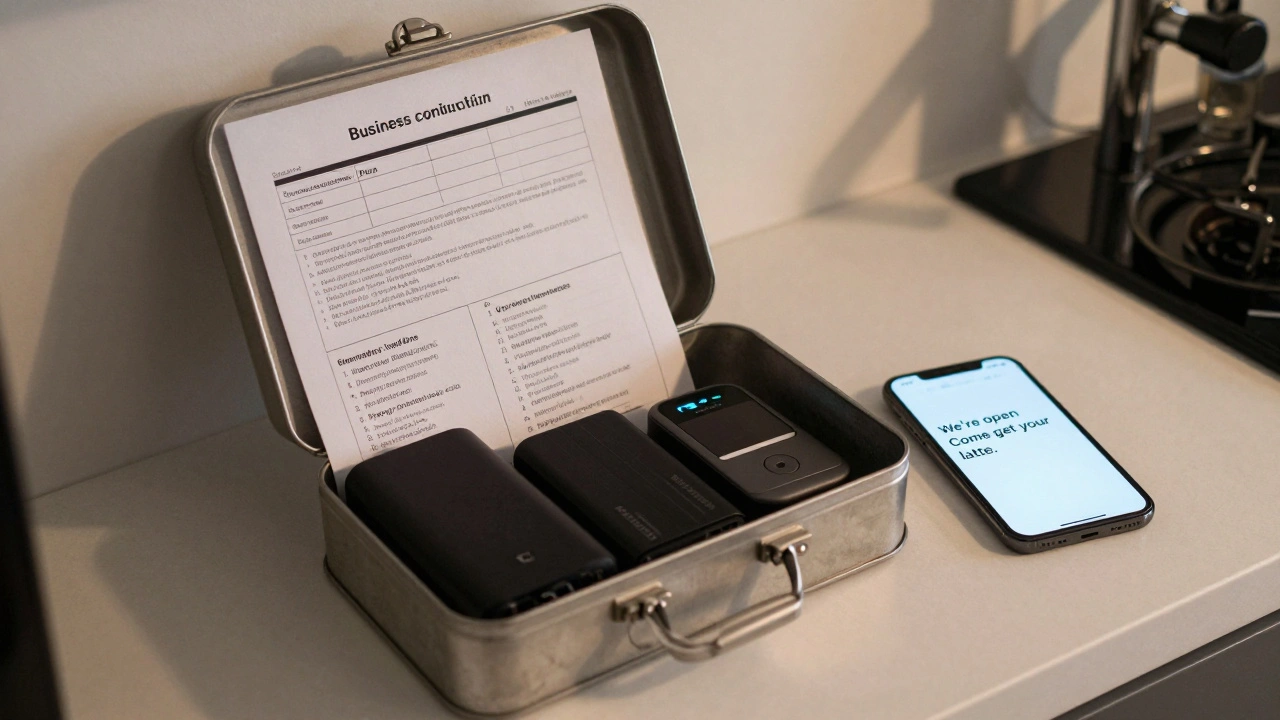
In late 2024, a small café in Portland lost its basement storage to a flash flood. Water damaged their espresso machines, inventory, and point-of-sale system. But here’s what they did right:
- They had a printed BCP tucked in the manager’s desk drawer.
- Their RTO for sales was 2 hours - so they switched to a mobile card reader and operated from the sidewalk.
- They had a list of backup suppliers (including a local roaster 10 miles away) already in the plan.
- They texted customers: “We’re open outside. Come get your latte.”
They lost $12,000 in inventory. But made $8,500 in sales the next week. Their plan didn’t prevent the flood. It prevented the collapse.
Where to Start Today
You don’t need to do it all at once. Start with this:
- Write down your top 3 critical functions.
- Ask: “If we lost this for 24 hours, what would break?”
- Find one free template and fill in your real info.
- Share it with one person - your bookkeeper, your lead technician - and ask them to spot flaws.
- Set a calendar reminder: “Review BCP - June 1, 2026.”
Business continuity isn’t about perfection. It’s about preparedness. The goal isn’t to avoid disasters. It’s to make sure your business doesn’t disappear when they hit.
Do I need a business continuity plan if I work from home?
Yes. Home-based businesses are just as vulnerable. If your internet goes out, your laptop dies, or you have a medical emergency, your clients still need service. Your plan should include backup devices, cloud access, alternative communication methods, and emergency contacts. Even a one-page checklist helps.
How often should I update my business continuity plan?
Update it at least once every six months - or anytime you make major changes: hire new staff, switch software, relocate, or add a new product line. Set a recurring calendar event. Treat it like a tax deadline. Outdated plans are worse than no plans because they give false confidence.
Is a business continuity plan the same as a disaster recovery plan?
No. Disaster recovery (DR) focuses on restoring IT systems - servers, data, networks. Business continuity (BC) is broader. It includes DR, but also covers people, locations, supply chains, and customer communication. Think of DR as one part of your BC plan. You need both.
Can I use a free template for my industry?
Absolutely. Free templates from Ready.gov, the Small Business Administration (SBA), or ISO are designed to be flexible. Customize them. Replace generic examples with your real processes. A restaurant’s plan will look different from a software agency’s - and that’s fine. The structure matters more than the exact wording.
What’s the cheapest way to start a business continuity plan?
Start with a Google Doc. List your top three critical tasks. Write down who does what and how long each can be down. Add your key contacts. Print one copy. Store it in a drawer. Test it with a colleague next week. That’s it. No software, no consultants, no cost. The hardest part is starting - not spending money.