Training for hospitality technology training isn't about teaching someone which button to click. It's about building a mental map of how the digital tool improves the guest experience. When a server knows exactly how the handheld ordering system syncs with the kitchen, they spend less time staring at a screen and more time engaging with the customer.
Key Takeaways for Tech Training
- Move from one-time seminars to continuous, bite-sized learning.
- Focus on "Guest-First" scenarios rather than feature lists.
- Create a tiered certification system to reward tech mastery.
- Prioritize the "Why" before the "How" to increase employee buy-in.
Mastering the Core Tech Stack
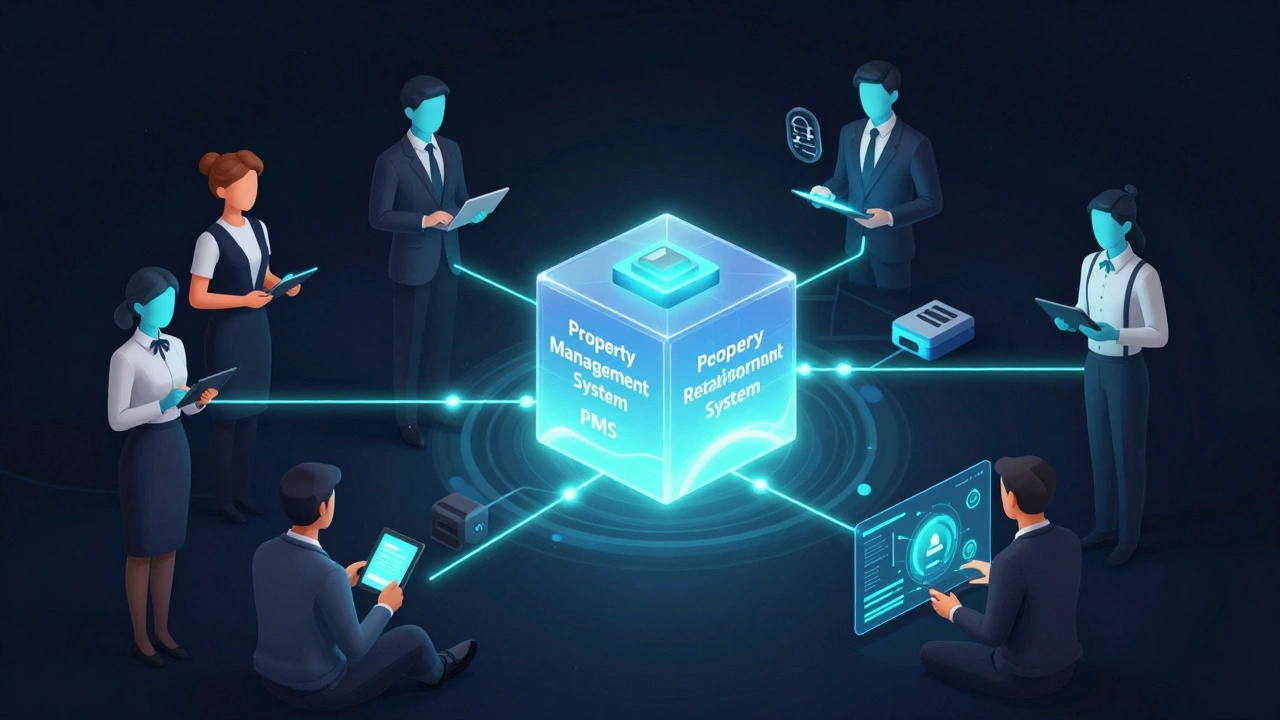
Before you can train your team, you have to understand what you're actually teaching. In a modern hotel or restaurant, the software isn't just one program; it's an ecosystem. The center of this world is usually the Property Management System (or PMS), which is the central hub used to manage reservations, guest check-ins, billing, and room assignments. If the PMS fails or the staff can't use it, the entire operation grinds to a halt.
Then you have the Point of Sale (or POS), which is the system used to process transactions, manage menu items, and track sales in dining or retail areas. While the PMS handles the stay, the POS handles the spend. The magic happens when these two talk to each other-like when a guest charges a cocktail to their room. Training must emphasize this connection so staff don't treat them as isolated islands of data.
Finally, many environments now use Customer Relationship Management (or CRM) tools, which are platforms used to track guest preferences, loyalty points, and communication history. When a concierge knows a guest prefers a high-floor room and a sparkling water based on a CRM note, the technology becomes invisible and the service becomes personal.
| System | Primary User | Key Attribute | Critical Value |
|---|---|---|---|
| PMS | Front Office | Centralization | Occupancy Rate tracking |
| POS | F&B Staff | Speed | Average Check Value |
| CRM | Management/Concierge | Personalization | Guest Lifetime Value |
The "Guest-Scenario" Training Method
Stop doing feature-based training. Don't tell a staff member, "This is the guest profile tab." Instead, give them a scenario: "A regular guest arrives who is allergic to peanuts and wants a late checkout. How do you handle this in the system?"
When you tie a software function to a real human problem, the brain retains the information better. This approach transforms the technology from a chore into a tool. For example, instead of teaching the "Upsell Module," teach the staff how to offer a suite upgrade to a couple celebrating an anniversary. The goal is to make the software an extension of their hospitality skills, not a barrier between them and the guest.
Building a Tiered Learning Path
You can't expect a new hire to master the entire tech stack in week one. That's a recipe for burnout and mistakes. Instead, break the training into levels. Level 1 should be "Survival Mode"-the absolute basics needed to get through a shift without crashing the system. This includes basic logins, processing a payment, and finding a reservation.
Level 2 is "Efficiency Mode." This is where you teach shortcuts, how to handle common errors, and how to use the Cloud Computing capabilities of the system to access data from a tablet while walking the floor. Level 3 is "Expert Mode," reserved for those who can troubleshoot basic issues or train others. When you gamify the process with certifications, employees actually compete to become the "tech guru" of the shift.
Dealing with Tech Resistance
You will always have the veteran employee who says, "I've been doing this for twenty years with a pen and paper, and it worked fine." Resistance usually comes from a fear of looking incompetent in front of guests. To solve this, create a "safe failure" environment. Set up a training sandbox-a mirror of your live system where they can click every button and delete every record without any real-world consequences.
Pair your tech-savvy "digital natives" with your veterans. This peer-to-peer mentoring reduces the intimidation factor. When a colleague shows them a trick that saves five minutes of paperwork, the veteran is much more likely to adopt the tool than when a corporate manager tells them it's "mandatory."

Maintaining Proficiency Post-Onboarding
The biggest mistake in hospitality is the "train and forget" model. Software updates happen overnight, and new features are added every quarter. If you don't have a system for continuous learning, your staff will only ever use 20% of the software's capability.
Implement "Tech Tips" during the daily huddle. Spend two minutes showing one specific feature-like how to quickly split a check or how to flag a room for immediate cleaning. This keeps the technology top-of-mind and encourages staff to explore the system. Additionally, keep a physical or digital "Cheat Sheet" at every workstation. No one remembers every keyboard shortcut, and a quick-reference guide prevents the panic that leads to guest-facing errors.
Measuring the Success of Your Training
How do you know if your training is actually working? Don't just ask if they "feel" comfortable. Look at the data. If your PMS shows a high number of corrected billing errors, your training on the billing module is failing. If the time between a guest requesting a room and the room being marked "ready" is lagging, your housekeeping communication tech isn't being used correctly.
Run "mystery shops" specifically focused on tech. Have a friend try to check in with a complex request and watch the employee. Do they struggle with the interface? Do they apologize for the "slow system"? If the technology becomes a topic of conversation, it means it's getting in the way. The ultimate sign of successful tech training is when the guest doesn't even notice the software is there.
What is the best way to train staff who aren't tech-savvy?
The best approach is to use a "sandbox" environment where they can practice without fear of breaking anything. Avoid technical jargon and focus entirely on the guest outcome. Pairing them with a tech-savvy peer for one-on-one mentoring is also far more effective than a group classroom session.
How often should hospitality tech refresher training occur?
While a full retraining should happen annually or after major software updates, "micro-learning" should be daily. Short, 2-minute tips during shift huddles prevent skill decay and keep the team updated on new features without disrupting operations.
Should we use the software vendor's training or create our own?
Vendor training is great for learning what the buttons do, but it lacks the context of your specific business. Use vendor training for the technical basics, then layer your own "scenario-based" training on top to show how those features apply to your specific brand standards and guest needs.
How do I handle training for high-turnover staff?
Create a standardized, digital onboarding checklist and use video tutorials. When training is recorded, you don't have to repeat the same basic instructions every time a new hire starts. Focus on a "modular" training approach where new hires can check off competencies as they master them.
What is the most common mistake in hospitality tech training?
The most common mistake is focusing on the software's features rather than the guest's experience. When staff are taught "how to use the tool" instead of "how to solve the guest's problem using the tool," they become robotic and lose the personal touch that defines hospitality.
Next Steps for Managers
If you're feeling overwhelmed by your current tech setup, start small. Pick one system-like your POS-and identify the three most common errors your staff make. Create a one-page "Quick Fix" guide for those specific errors and present it at tomorrow's huddle. Once you see the confidence grow in one area, you can expand the same logic to your PMS and CRM. Remember, the goal isn't to create IT experts; it's to create hospitality professionals who happen to be great with tools.